Dolphin gets a Columns view again
I am happy to announce that Dolphin has a new view mode: Columns. Each column shows one folder. Select a folder and its content opens in the next column, so the path from the folder you opened down to your selection stays on screen. This layout is known as Miller columns, after Mark S. Miller, who created it in 1980.
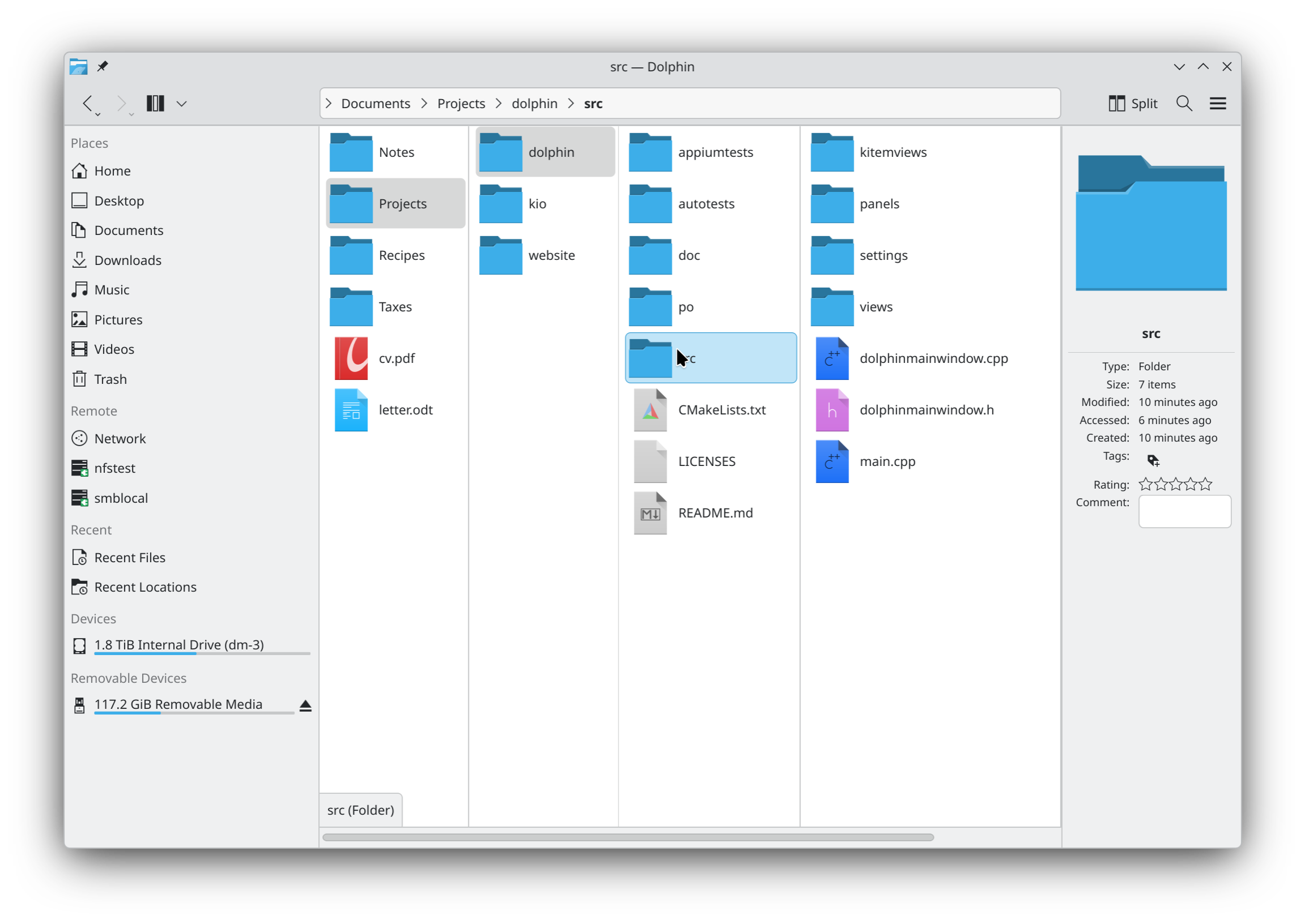
It is now in the master branch of Dolphin, not yet in Dolphin 26.12. We can still bring it into 26.12 until November 12th, if the testers find it ready. Otherwise it will ship in Dolphin 27.04. Either way it needs testers, so read on.
A bit of history
Dolphin had a column view from KDE 4.0, built on Qt's QColumnView. When Peter Penz moved the views to the new KItemViews engine for Dolphin 2.0 in 2011, the column view was not ported, and it was gone. Bug 387455, "Column view in Dolphin", was opened in 2017. With 32 people in CC, it has been one of the most requested features. It is now closed.
Sebastian's start
In February 2026 Sebastian Englbrecht opened MR !1185, a first Miller columns view built on KItemViews. After a few weeks of review he handed it over to me, and I continued it until MR !1524 was merged. He wrote:
Yeah, thank you very much meven for taking this to and over the finish line. I came to my limits and wouldn't have been able to polish it this well.
Thank you Sebastian, without your first version this would not exist.
What it does
- The folder that you open is the first column. Up, Back and the breadcrumb add its parent in front.
- A folder or an archive that you select opens the next column. Left, Right and Return move between the columns.
- The location bar, the window title, New Folder, Paste and the terminal panel follow the last column.
- Columns fit their content by default, or use a fixed width. Drag a handle to resize a column, double click it to fit the columns.
- Sort, grouping, hidden files, zoom and previews apply to every column, and a restored session brings back the open columns.
- Ctrl+4 switches to the mode, and Settings > View > Columns has its options.
The Columns mode is in the Dolphin application only for now. Konqueror and other apps that embed Dolphin's file view do not offer it yet.
The testers
The view behaves the way it does because people tried it and told us what was wrong, in more than 600 comments. Lluc Pallejà tested nearly every interaction and filed over a hundred comments with screencasts. Nate Graham did the UX review. Roke Julian Lockhart Beedell, Alexander Wilms, Karol, Kai Uwe Broulik, Leopold Luley, Akseli Lahtinen, Felix Ernst, Blenux, Ke, Linux ForAll and others found bugs and argued the details. Kudos to all of you.
Please test it
Whether the view goes into Dolphin 26.12 is decided on November 12th, see the KDE Gear 26.12 schedule. Until then, it needs people using it on their own folders, with their own habits.
On Arch Linux, the dolphin-git package from the AUR builds Dolphin from master. On any distribution, kde-builder can build it:
kde-builder dolphin
kde-builder --run dolphin
If your distribution ships a recent KDE Frameworks, as Arch Linux or Fedora do, add
--no-include-dependencies to build Dolphin alone. Then switch to Columns with Ctrl+4.
Try your daily navigation, the keyboard, long names, large or remote folders, drag and drop, and resizing the window. Tell us also how it feels that the first column is the folder that you opened, as reviewers disagreed on this.
Please report bugs in the view-engine: columns mode component of Dolphin, with the steps and a screenshot or screencast when you can. General impressions are welcome in the comments of this post.
That's all, folks.